

A Service Plan is organized into a clear hierarchy where Categories act as the primary containers for specific Items.
-
Provider Autonomy: The creation and structure of categories depend entirely on the specific type of service being provided and the clinical judgment of the provider.
-
ABA Therapy Example: The categories currently displayed are modeled after standard ABA Therapy protocols.
-
Unlimited Scalability: There is no restriction on the number of categories you can create within a single Service Plan.
-
Modification: You can add or modify categories at any time by editing the Service Plan directly.
How to Create a New Category
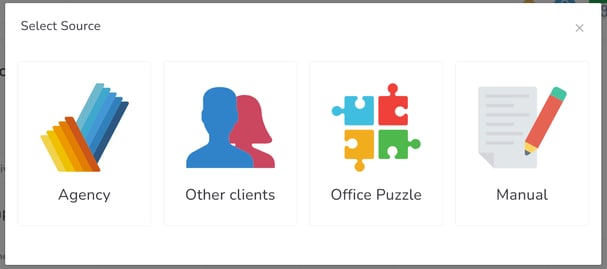
To begin, click the +New Category button. You will be presented with four distinct sourcing options to populate your new category:
| Option | Description |
| Agency | Pulls predefined category templates and standards established at the organizational level. |
| Another Client | Allows you to clone a category structure from a different patient’s plan to save time. |
| Office Puzzle | Accesses the built-in library of global templates provided by the platform. |
| Manual | Grants full control to create a unique category name and parameters from scratch. |